2026년 10월 16일
MyKaraoke Video를 더 좋게 만들기 위해 열심히 노력해 왔고, 최근에는 많은 기능을 출시했습니다. 새로운 기능과 개선 사항이 너무 많아 전부 나열하면 변경 기록이 아주 길어질 정도예요. 그래서 주요 내용만 소개합니다.
가장 큰 변화는 노래를 받아쓰는 비용이 크게 줄었다는 점입니다. 여기에 가사 주변의 타이밍을 더 세밀하게 조정하고, 동영상에 타이틀 카드를 추가할 수 있으며, 편집기와 대시보드에도 편리한 기능이 몇 가지 더해졌습니다.

이제 원클릭 생성기에서 두 가지 받아쓰기 엔진을 사용할 수 있으며, 기본값은 더 저렴한 엔진입니다.
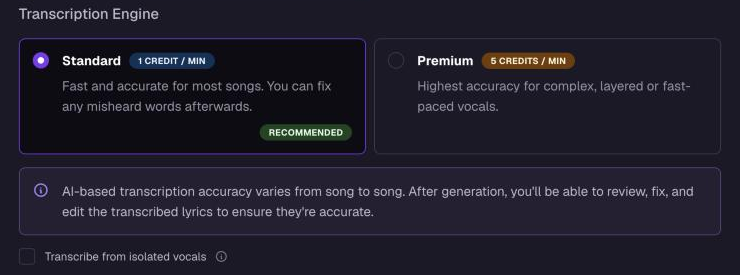
표준: 분당 1크레딧. 대부분의 노래에 적합합니다.
프리미엄: 분당 5크레딧. 복잡하거나 여러 겹으로 쌓인 보컬, 또는 빠른 보컬에 권장합니다.
두 엔진 모두 노래의 언어를 자동으로 감지하므로 먼저 언어를 선택할 필요가 없습니다. 반주가 복잡한 노래라면 보컬 분리본에서 받아쓰기를 켜세요.
비디오 편집기에서 큐 및 타이머를 열어 가사에 맞춰 각 순간을 조정하세요.
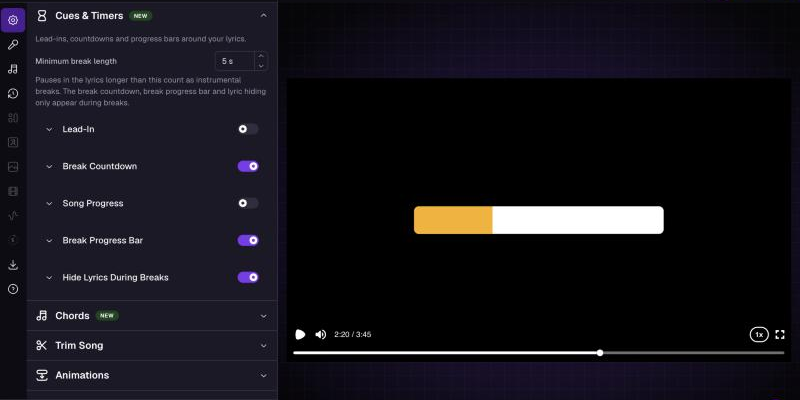
모든 줄에 또는 간격 뒤에만 적용되는 클래식 또는 새로운 페이드 테일 스타일의 도입부 효과.
휴식 카운트다운, 노래 진행률 표시줄, 휴식 진행률 표시줄을 각각의 타이밍, 위치, 크기, 색상으로 설정할 수 있습니다. 일부 색상은 다음 가수에 맞춰 표시됩니다.
휴식 중 가사 숨기기를 설정하면 긴 휴식 중에는 가사가 페이드아웃되고 다음 줄이 나오기 전에 다시 페이드인됩니다.
큐 설정은 동영상 버전별로 저장되며 기존 프로젝트에는 원래 설정이 그대로 유지됩니다.
원하는 스타일로 꾸민 노래 제목과 아티스트가 표시되는 타이틀 카드로 동영상을 시작하세요. 프로젝트 편집에서 아티스트를 추가하고 순서를 정할 수 있으며, "아티스트 - 노래"와 같은 제목을 붙여 넣으면 두 입력란이 모두 자동으로 채워집니다. 가사가 일찍 시작되면 카드 길이가 최소 2초까지 줄어들고, 이유를 설명하는 안내가 표시됩니다.
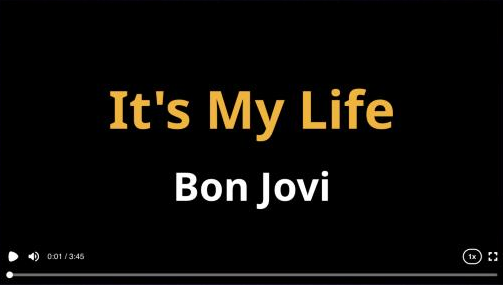
태블릿과 좁은 창에서는 이제 편집기가 플레이어를 설정 위에 쌓아 표시하므로, 동시에 조정하고 미리 볼 수 있어요. 플레이어와 타임라인의 크기를 조절할 수 있고, 탭은 가로로 스크롤돼요.
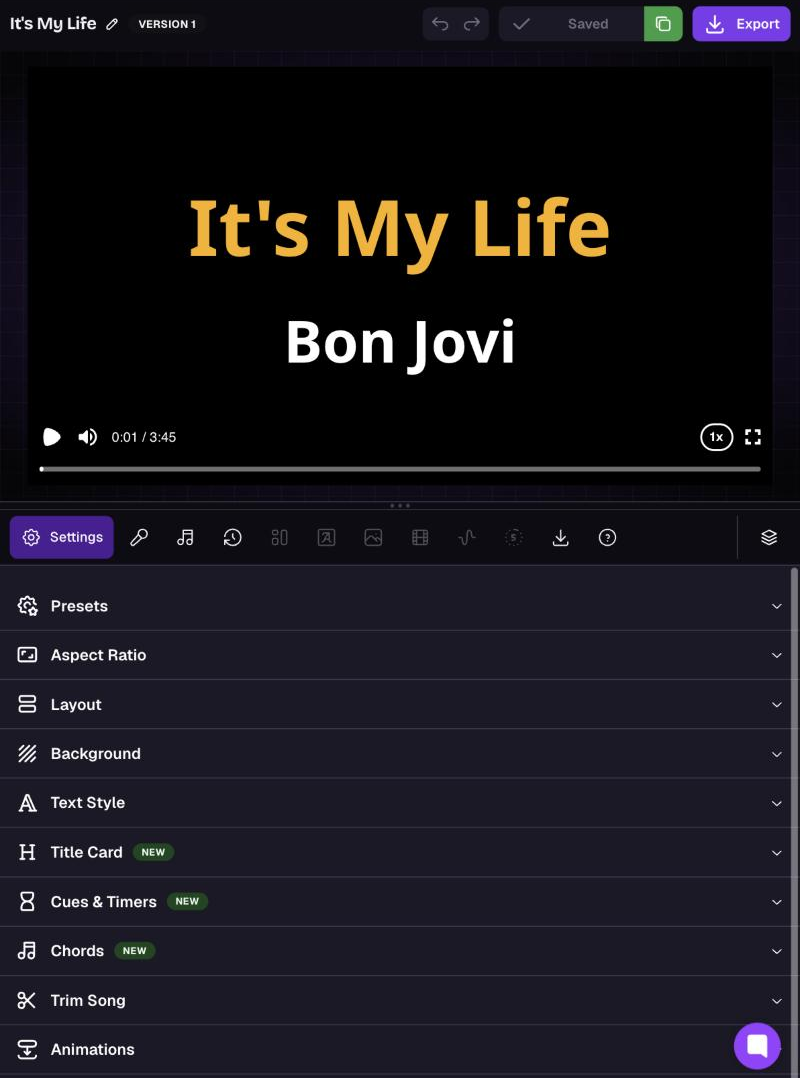
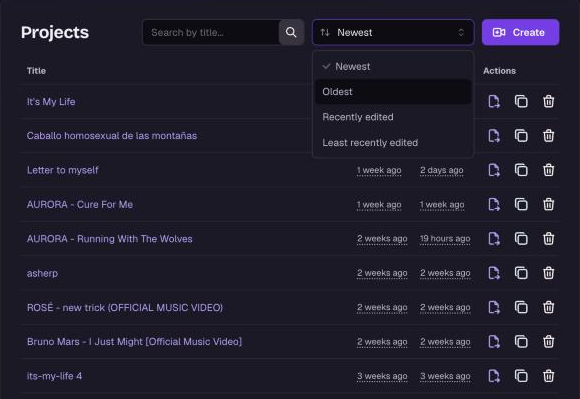
대시보드를 최신순, 오래된 순, 최근 수정순 또는 오래전에 수정한 순으로 정렬하세요. 이제 목록에 생성일과 수정일이 모두 표시돼요. 검색 중에는 관련성순으로 결과가 정렬돼요.
언제나처럼, 보고 싶은 기능이 있다면 피드백 포털에서 알려주세요.
함께 노래해 줘서 고마워요! 
2026년 7월 7일

Ever found the perfect song on YouTube but got stuck trying to download it before you could make a karaoke video?
Not anymore. 
Instead of downloading a YouTube video first, you can now paste the video link directly into the 1-Click Generator.
We'll automatically:
Import the audio
Separate the vocals
Generate and sync the lyrics
Only the audio is imported from the YouTube video. The original video is not used in your karaoke project, so you'll still choose your own background or visuals just like when uploading an audio file.
The generation process is exactly the same as uploading your own audio file—just much faster and more convenient.
Copy a supported YouTube video URL and paste it into the 1-Click Generator.
A preview will appear instantly so you can verify you've selected the correct song before generating.
Once you click Generate, we'll automatically:
Extract the audio in the cloud
Separate the vocals from the instrumental
Generate synchronized lyrics
Create your karaoke project
The YouTube video itself is not imported—only its audio is used to generate your karaoke project.
Everything happens automatically, so there's nothing to download or convert.
If you already have your own audio file, you can continue using the upload workflow as before.
Choose whichever method works best for you:
Paste a YouTube video link
Upload your own audio file
Generating a karaoke project from a YouTube video costs 1 credit per minute of the video.
Before generation starts, you'll always see the estimated credit cost, so there are no surprises.
Uploading your own audio files remains free.
The feature works with supported public YouTube videos.
If a video can't be processed due to restrictions or availability, you'll be notified before generation begins.
Creating karaoke projects has never been easier.
Find your favorite song on YouTube, paste the link into the 1-Click Generator, and let MyKaraoke Video do the rest.
We can't wait to see what you create! 
2026년 3월 4일
AI Transcription is now half the cost, you can click words directly in the Lyrics Editor preview to fix them, and we've aligned credit costs with our providers. Here's everything in this update.
AI Transcription now costs 5 credits per minute, down from 10.
We're making transcription the recommended way to sync your lyrics. When you use AI Transcription, our AI listens to your audio and generates word-level timestamps directly from what it hears — this produces the most accurate sync possible, especially for songs with complex vocals, harmonies, or fast-paced lyrics.
The tradeoff is that the AI may occasionally mishear a word, but fixing a misheard word is quick and easy compared to manually adjusting dozens of timing points in an inaccurate sync.
When you're in the Lyrics Editor (formerly known as Sync Editor) and spot a word that looks wrong in the video preview, you can now click it directly to edit it. Clicking a word pauses playback and opens the word editor right away.
Previously, you had to find the word in the lyrics timeline below, scroll to the right line, and then open the editor. This makes fixing misheard words from AI Transcription much faster — you see it, you click it, you fix it.
Credit costs are now always rounded up to the nearest minute. For example, a 1m 20s video now costs 2 credits instead of 1, and a 2m 05s video costs 3 instead of 2. Very short videos under a minute still cost 1 credit minimum.
This change aligns our billing with how our partners and providers charge us — they all round up to the nearest minute too. This makes our pricing more predictable and consistent across the board.
Transparent background exports will cost 1 credit per minute and files will be stored for 24 hours instead of 30 days. This is a very resource-intensive codec that produces huge files — often multiple gigabytes. We run a dedicated rendering system just to handle these, so we're unable to continue offering them at no cost. And given the file sizes, we can only keep them available for 24 hours instead of the usual 30 days.
One of our most requested features is finally coming. While the MP3+CDG format can't include all the visual features that MyKaraoke Video offers, we know many of you rely on legacy karaoke machines that only support this format. We're working on adding the ability to export an MP3+CDG file from any project.
2026년 2월 25일
You can now choose a background color for the Highlight effect, which will emphasize the current word. This new option works seamlessly with the existing color settings.
An image is worth a thousand words, but a video is worth a thousand images. Take a look below:
Happy creating!
2026년 2월 25일
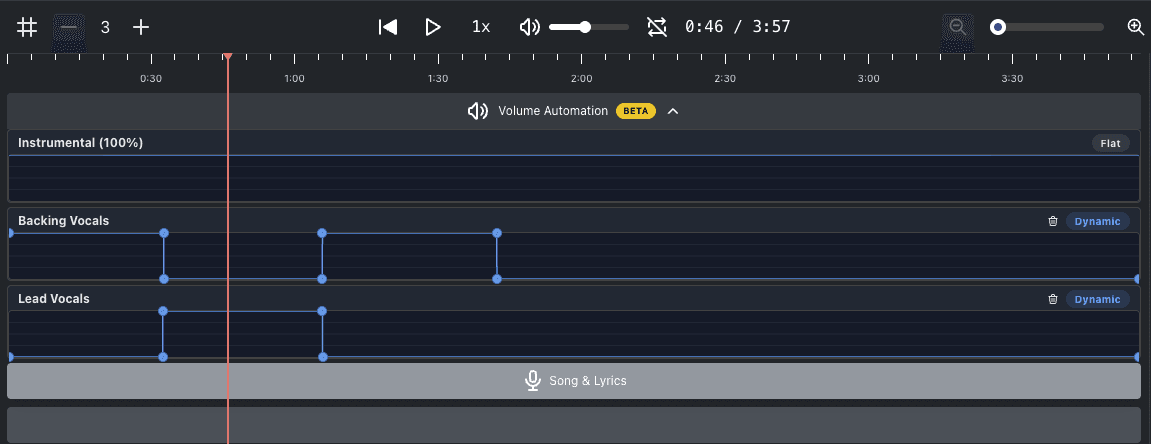
We're excited to introduce Volume Automation — a powerful new addition to the Advanced Editor that gives you full control over the volume of each audio track throughout your video.
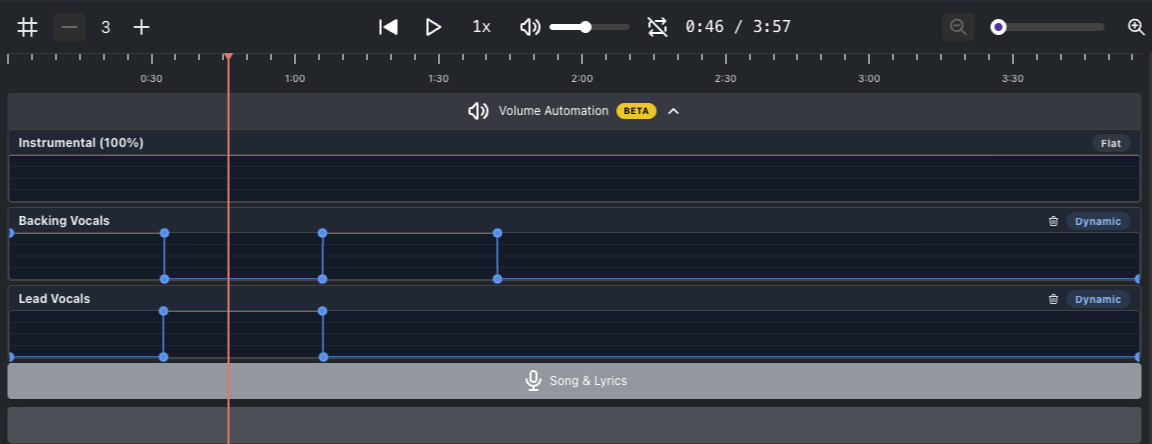
You can now adjust the volume of the Instrumental, Backing Vocals, and Lead Vocals tracks independently at any point in the timeline. Create smooth fade-ins, fade-outs, drop the vocals during a solo, or boost the instrumental for dramatic effect — all with a few clicks.
Click anywhere on a track's automation lane to add a keyframe
Drag keyframes to adjust volume and timing
Ctrl/Cmd + Click a keyframe to remove it
Reset a track with the trash bin icon to go back to a flat volume
Volume Automation is available in the Advanced Editor. Simply enable the Advanced Editor toggle in your project to get started.
For a full walkthrough, check out our help center article.
Volume Automation
Volume Automation gives you precise control over the volume of each audio track — Instrumental, Backing Vocals, and Lead Vocals — at any point in the timeline. Instead of a single, fixed volume level for an entire track, you can raise and lower each track dynamically throughout your video.
2025년 11월 21일
We’re excited to announce a game-changing new layout that lets you reach a global audience with a single click!
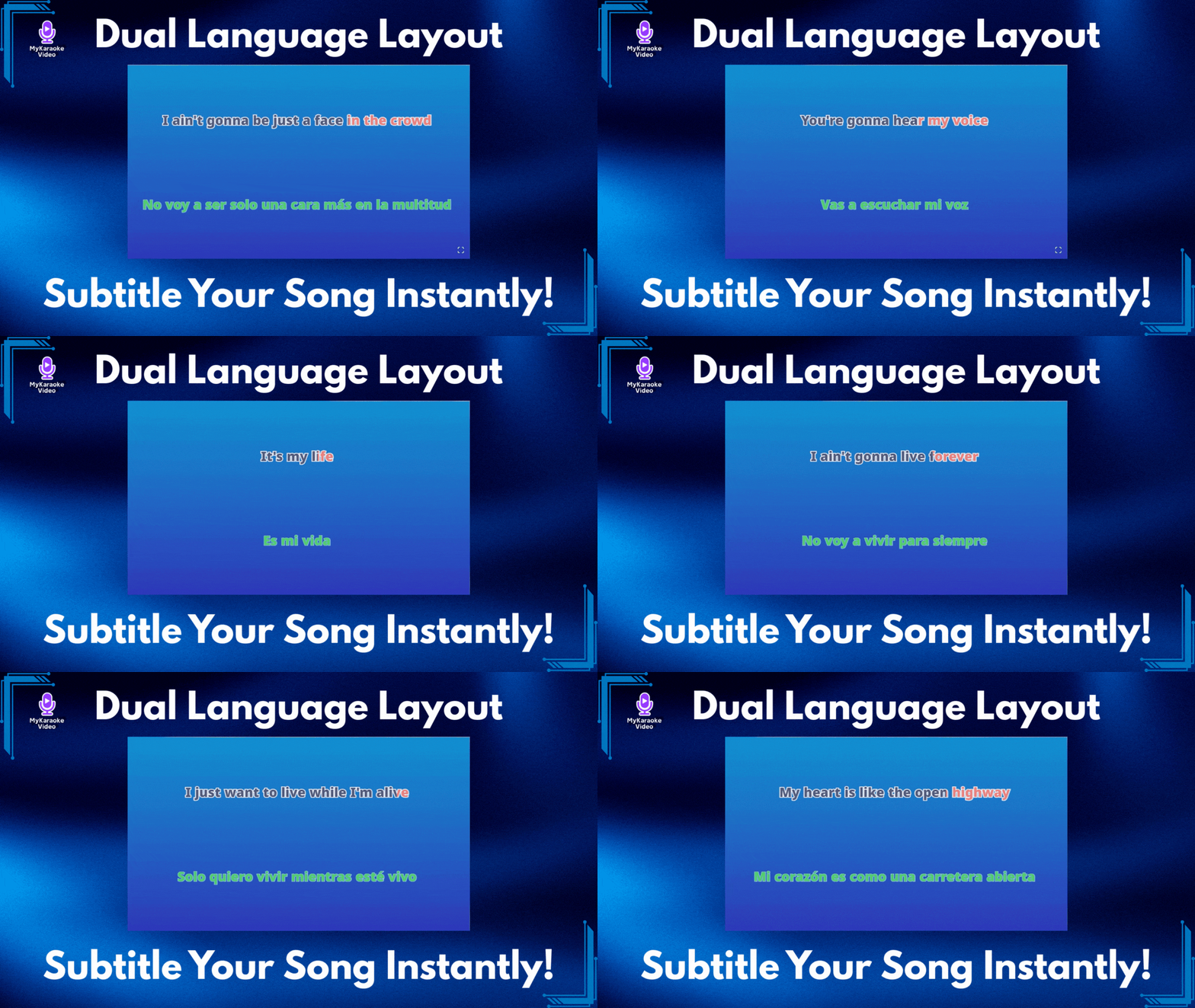
You asked for a way to add subtitles and translations to your videos, and we delivered. Say hello to the Dual Language Layout—the easiest way to display lyrics in two languages simultaneously, perfectly synced and beautifully styled.
The Dual Language Layout isn't just a new look; it's a complete solution for artists and creators. Whether you want to add English subtitles to a Spanish hit, or translate your song into Japanese for a new fanbase, this layout handles it all automatically.
To make this layout truly powerful, we’ve integrated a massive upgrade to our Sync Editor. You don't need to hire a translator or copy-paste text manually:
200+ Languages: Our AI can instantly translate your lyrics into over 200 languages.
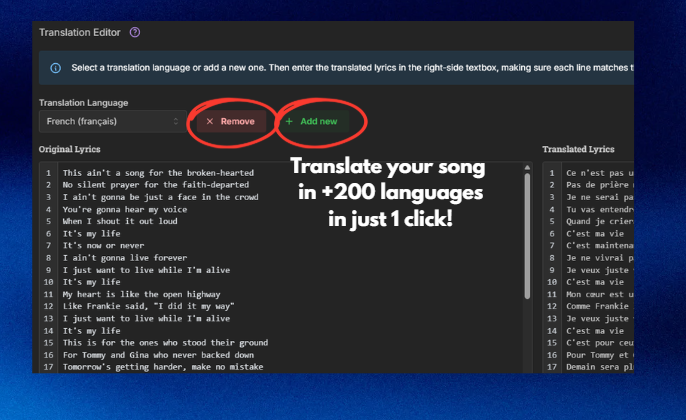
1-Click Simplicity: Just select your target language, click Translate with AI and let the AI do the work.
Automatic Sync: Here is the best part—you never have to sync the translation. The Dual Language Layout intelligently locks the translated text to your original timing. If your original lyrics are synced, your subtitles are too!
We know your brand matters. The Dual Language Layout gives you total control. You can style your Original Lyrics and your Translation independently—change fonts, colors, and sizes to ensure your primary lyrics pop while the subtitles remain easy to read.
Ready to go global?
Open the Sync Editor to generate your translation with AI.
Go to your Layout Settings and select Dual Language.
Customize, export and share!
For a step-by-step guide on using this new feature, visit our help center:
Dual Language Layout Guide: Translate & Sync Your Lyrics
Easily display synchronized lyrics in a second language using the Dual Language Layout and AI Translation.
2025년 9월 18일
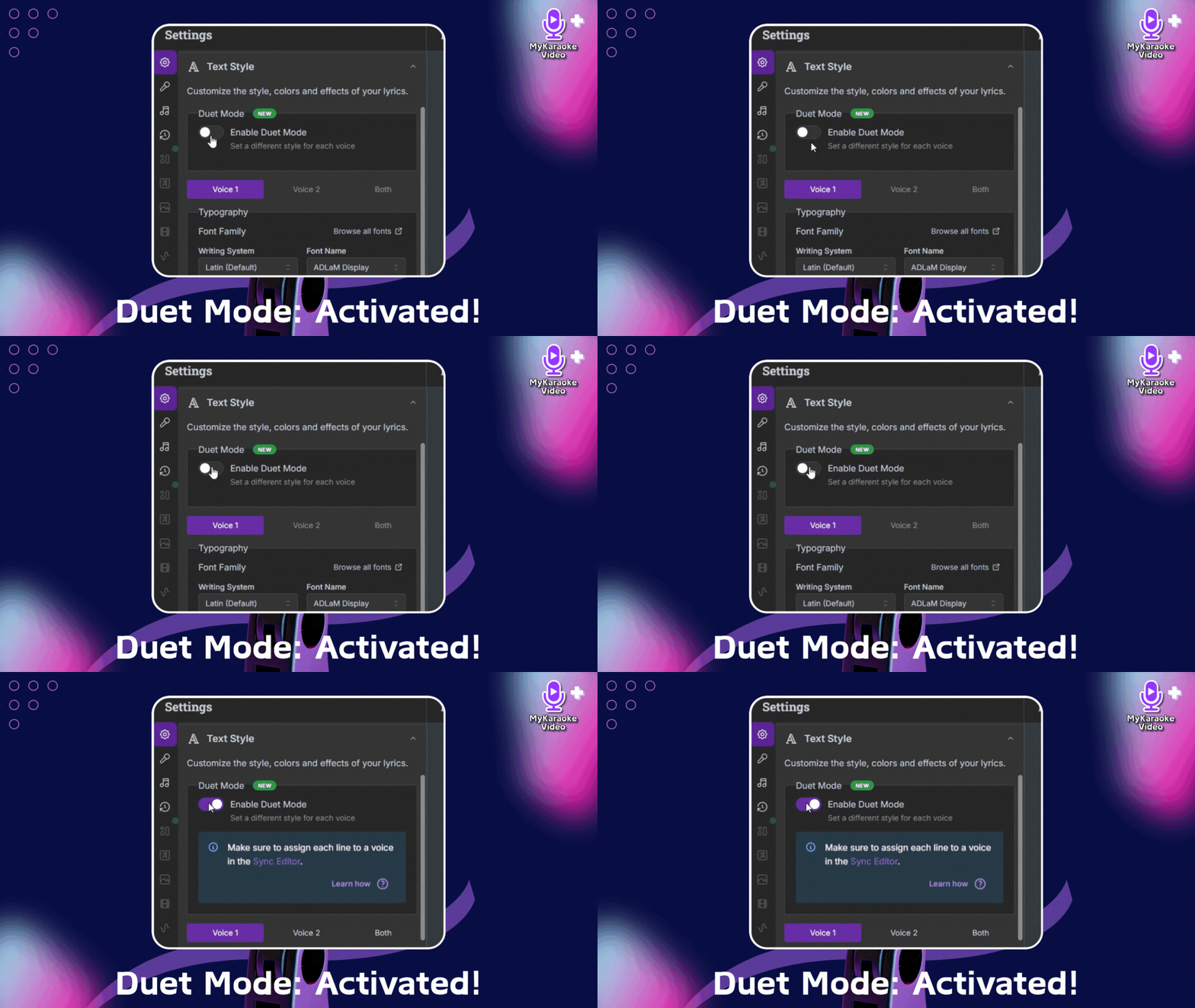
Get ready to take your karaoke and lyric videos to a whole new level of creativity! We're thrilled to announce a powerful new feature that's been highly requested: Duet Mode is now available for ALL our video layouts!
You know and love our versatile layouts – Karaoke, Scrolling, Single, and Duet – which give you amazing control over how your lyrics appear. While our dedicated Duet Layout remains a fantastic option for two singers, we've now unlocked even more flexibility.
Mastering Video Layouts and Text Styles
A Guide to Customizing Your Lyric and Karaoke Video Appearance
You can now enable Duet Mode within any of our existing layouts. This means if you want to create a video for a song sung by two people but prefer the aesthetic of a scrolling video, or a unique single-singer layout, you absolutely can! The core Duet layout is still here, but this new mode empowers you to apply two-singer styling across the board, giving you more options than ever for duets.
If you have more questions about using Duet Mode, please visit this article:
Duets: How to use the Duet layout
Learn to create multi-singer karaoke videos with MyKaraoke Video's Duet layout. This guide covers activating duet layout, assigning lyrics to singers in the sync editor, understanding color coding (blue/red/green), and customizing text styles. Also explains how to prevent doubled lyrics when both singers are active. Perfect for duets, group performances, and distinguishing between different vocalists.
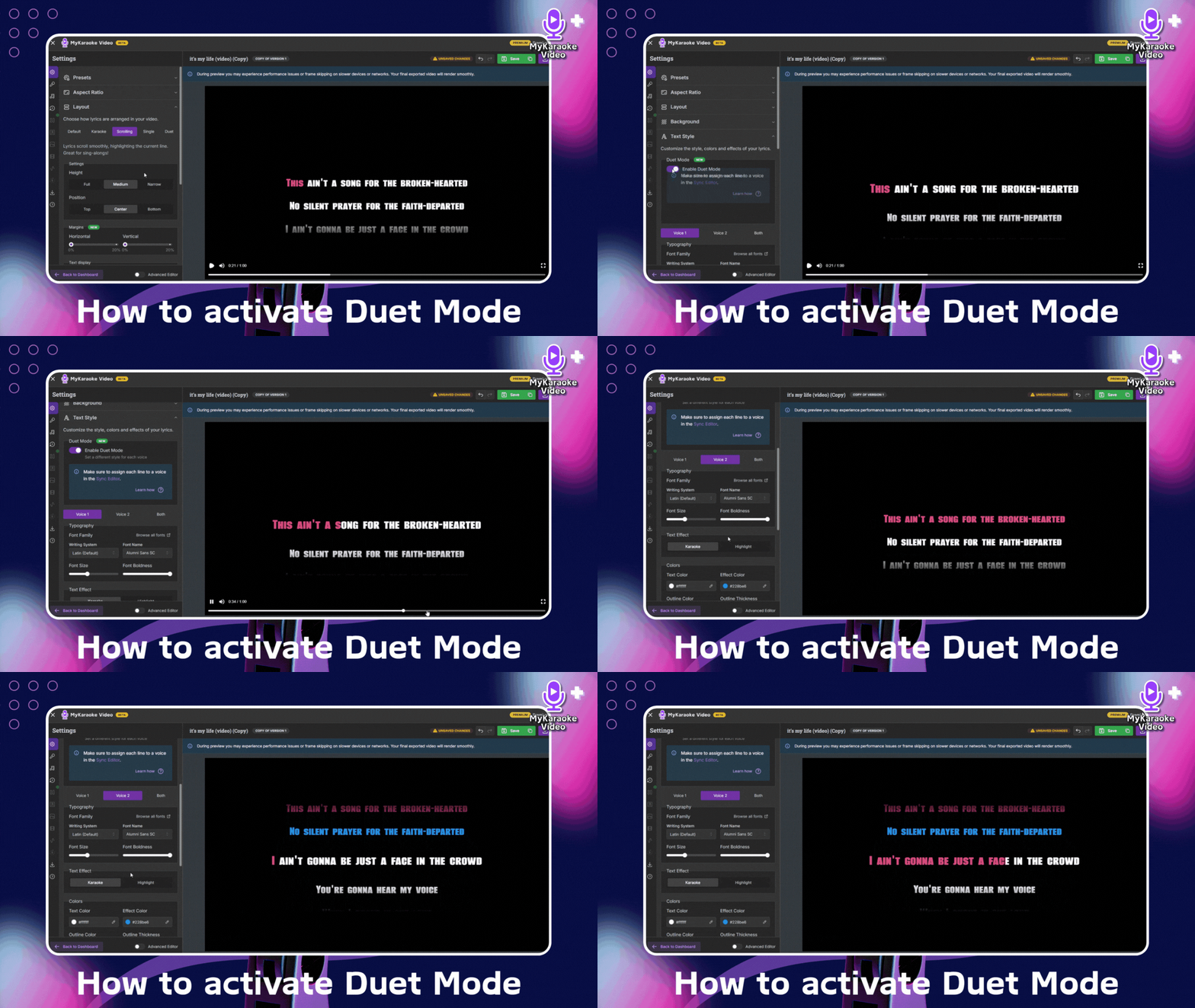
To activate this powerful feature, simply navigate to the Settings menu, then find the "Text Style" option. You'll find the new "Enable Duet Mode" toggle there. Once activated, you'll have the power to customize:
Typography: Choose unique fonts, sizes, and weights for each singer.
Colors: Differentiate voices with distinct text and effect colors.
Effects: You can choose between Karaoke and Highlight Effect

We believe this new flexibility will unlock incredible possibilities for your videos, allowing for more visually engaging and personalized experiences for your audience.
Ready to give it a try? Dive into your projects and explore the new Duet Mode today!
Happy Creating!
The mykaraoke.video Team
2025년 9월 4일
Get ready to level up your karaoke video creation like never before! We're absolutely thrilled to announce the launch of our brand new Templates feature, designed to save you time, boost your creativity, and ensure your videos always have that signature shine! 
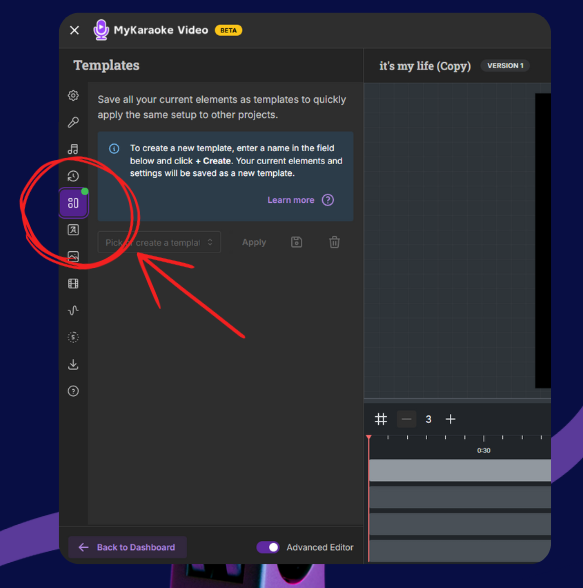
Ever wished you could just "copy-paste" your favorite video styles? Now you can! With our new Templates feature, you can save your perfected video configurations – from stunning backgrounds and eye-catching text styles to custom lyric layouts and even uploaded graphics – and apply them to any project with a single click. Think of it as your personal, on-demand style guide!
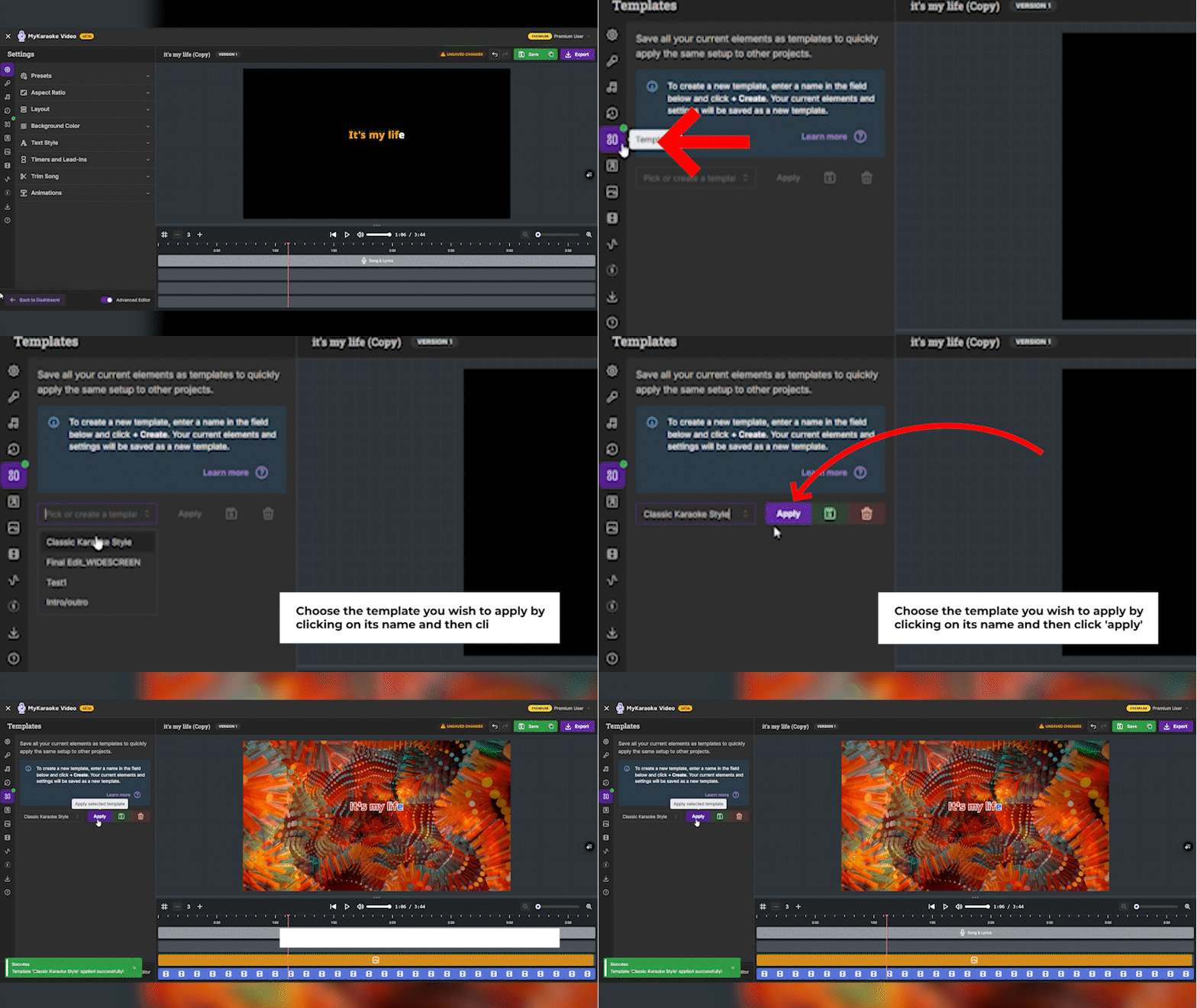
Dive into Advanced Editor: To unlock the power of Templates, make sure you're in our "Advanced Editor" mode. Just flip that handy "Advanced Editor" toggle switch at the bottom left of your screen.
Find the Templates Panel: In the left-hand sidebar, you'll see a brand new "Templates" icon. Click it to open the panel.
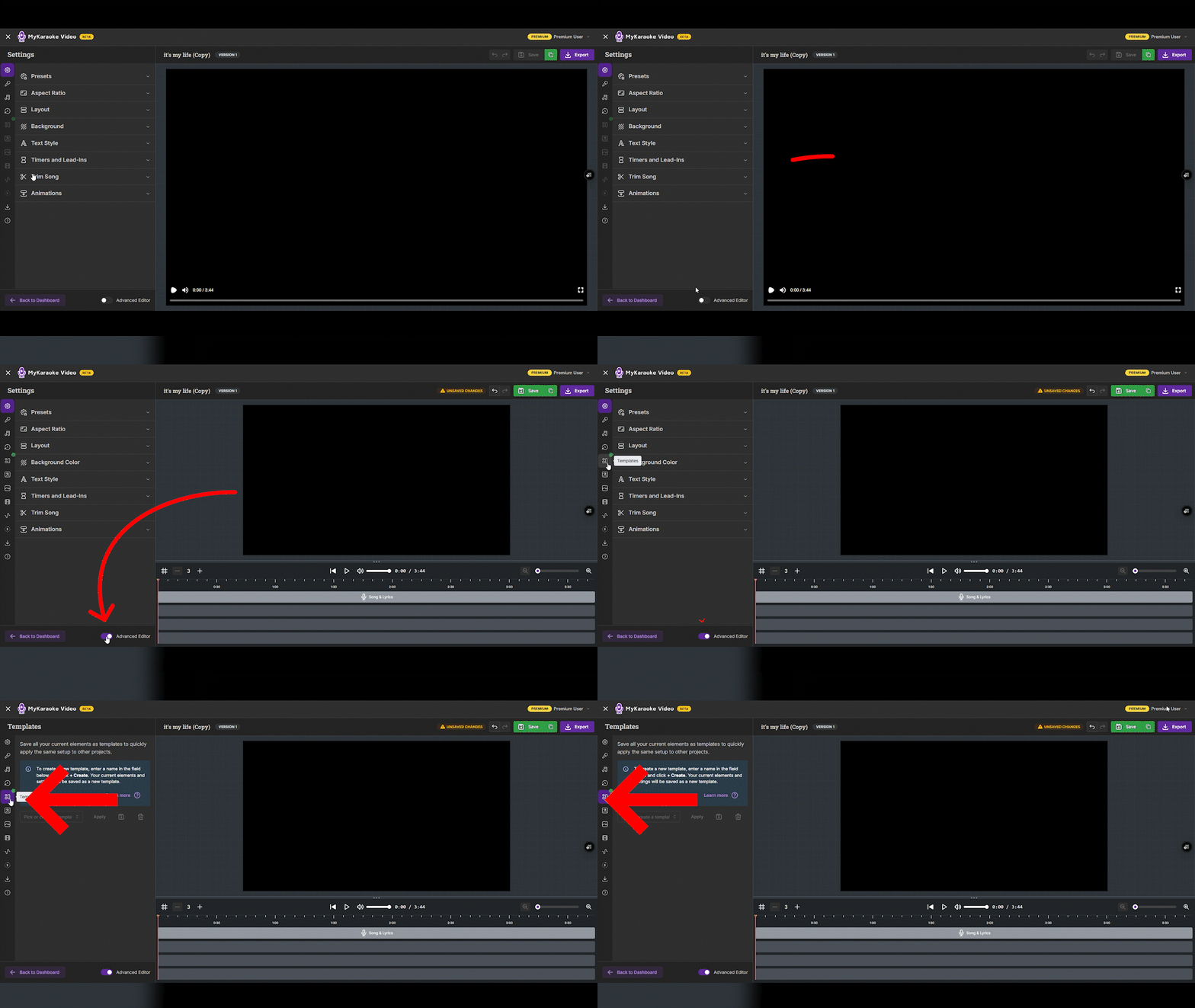
Create Your Masterpiece: Got your video looking chef's kiss perfect? It's time to save it! In the Templates panel, type a super clear and descriptive name for your template (like "My Epic Intro Style" or "Sleek & Modern Vibes"). Then, hit that "+ Create [Your Template Name]" button. Voilà! Your custom style is saved.
Apply with Ease: Need that style for a new song? Just open the Templates menu, select your saved template from the list, and click "Apply." Boom! Your project instantly gets that professional look.
Manage Like a Pro: Want to update a template with your latest tweaks? Select it and click the floppy disk icon. Need to clear out old ones? The trash can icon is your friend!
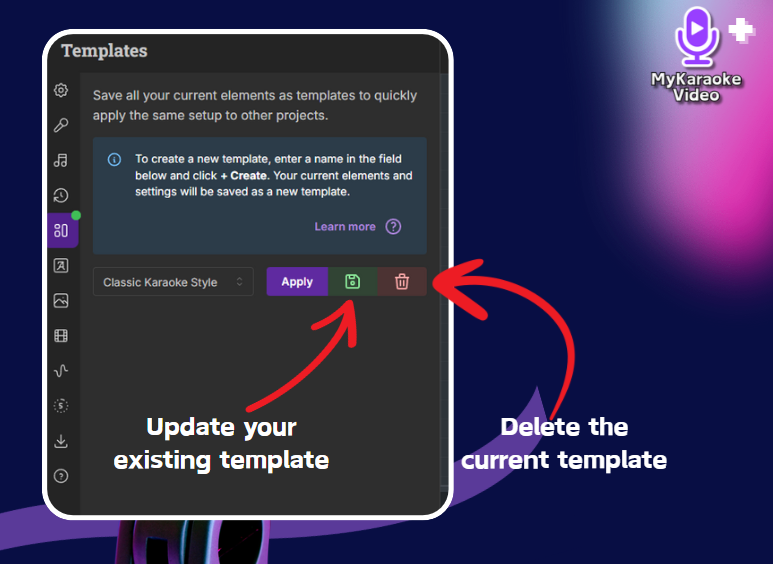
Want to learn more about this new feature? Check out the help article below:
Getting Started with Templates
This guide will walk you through the process of using the Templates feature, an advanced editing functionality designed to streamline your video creation.
We're so excited for you to explore this new feature! Templates are here to make your video creation faster, easier, and more consistently awesome. Give them a spin and let us know what you think!
Happy creating!
The MyKaraoke Video Team
2025년 8월 16일
We’ve been hard at work since our big editor revamp, and guess what? We didn’t stand still! We’ve kept the momentum going, rolling out a fresh wave of updates designed to give you even more creative control and a smoother editing experience. Here’s the rundown:

Take control of your visuals! You can now adjust the opacity of your background images and videos. This means perfect blending, subtle effects, or creating unique layered looks by combining transparent visuals with solid color backgrounds!


Your lyrics deserve their own stage! Add custom background colors or pre-set gradients behind your lyrics, and fine-tune their transparency with opacity controls specifically for these lyric backgrounds. It’s all about enhancing readability and personalizing your text like never before!

Get your song pacing just right. We've added the ability to configure the time gap for lead-in bars. Now you can set exactly how long to wait before a lead-in appears during instrumental breaks, ensuring a more natural flow.
Elevate your titles and headings! In the Advanced Editor, you can now add shadow effects to your text elements. Customize the shadow's position, color, distance, and blur for a professional, dimensional look.


Editing just got way more forgiving! Both our basic and advanced editors, plus the sync editor, now feature classic Undo and Redo buttons, complete with familiar hotkeys (Ctrl+Z/ ⌘+Z for Undo, Ctrl+Shift+Z/ ⌘+Shift+Z for Redo). Experiment freely knowing you can always go back!
Plus, we’ve been busy with a whole lot more under-the-hood updates, including a significant improvement to our "unsaved changes" detection across all editors (including the sync lyric editor)! This means no more accidental data loss when switching menus or refreshing pages – your work is better protected.
We’re thrilled to bring you these enhancements and can't wait to see what amazing videos you create with them!
Let us know what you think, We would love your feedback!
MyKaraoke.video Team
2025년 8월 7일
Get ready for a massive upgrade to your creative process! We've merged our former Standard and Premium editors into one powerful, unified experience. Now, you can instantly toggle between the intuitive Basic mode and the powerhouse Advanced mode, all from a single, streamlined screen.
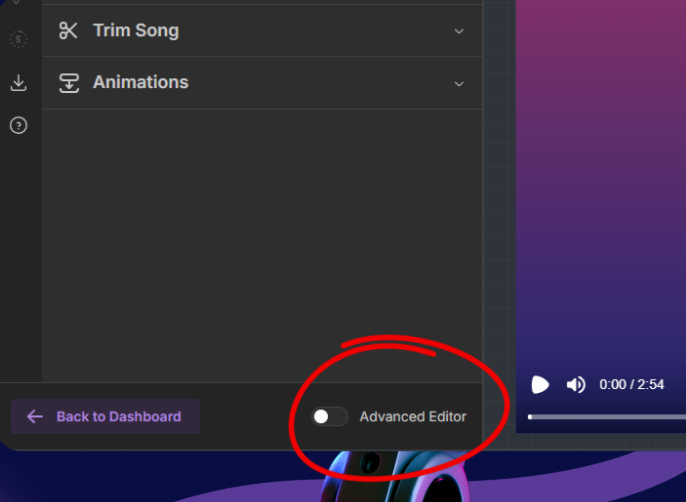
This is a game-changer for your workflow, and it’s packed with new features you’ve been asking for.
Here’s what’s new:
Advanced Editor for Standard Plans: The full power of the layer-based Advanced Editor is now available to all Standard and Premium subscribers!

Create On The Go: The entire unified editor, including the powerful Advanced mode, is now fully mobile-optimized. Your projects go where you go.

"Versions" in Basic Mode: Unleash your creativity! The "Versions" feature is now in Basic mode, letting you effortlessly create multiple visual styles for the same song.

New Drop Shadow Effect: Make your lyrics pop like never before with the new Drop Shadow effect for all text elements in Advanced mode!

Unified Sync Editor: Perfect your timing faster. The Sync Editor is now just a click away in both Basic and Advanced modes from the new unified Lyrics menu.

Bigger Video Preview: Get a better view of your masterpiece. Instantly resize the timeline in Advanced mode for a larger, more detailed video preview.

Faster & Smoother: We’ve rolled out significant performance and usability optimizations across the board for a more responsive and enjoyable creative experience.
This is more than just an update; it's a complete reimagining of the workflow, designed to be faster, more powerful, and more intuitive than ever before.
As always we welcome your feedback. We can't wait to see what you create!